Storage Target screen reference
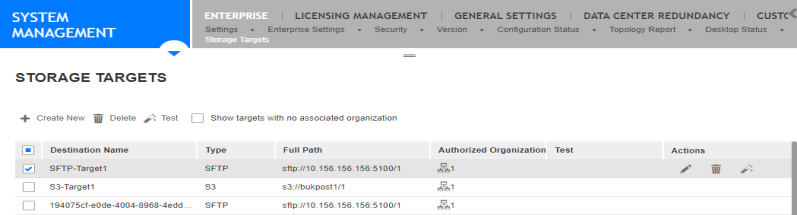
The Storage Target screen includes several columns that contain information about each storage target configured in the Enterprise Manager. The screen also includes options that allow you to create, edit, delete, and test storage targets.
|
Item |
Description |
||||||||||||
|---|---|---|---|---|---|---|---|---|---|---|---|---|---|
|
Create new option |
To create a new storage target, select the Create new option. |
||||||||||||
|
Delete icon |
To delete a storage target, select the storage target, and click the Delete icon |
||||||||||||
|
Test icon |
To test that the configuration of a storage target is valid, select a storage target, and click the Test icon |
||||||||||||
|
Show targets with no associated organization |
In a multi-tenant enabled environment, this check box displays only to users that have scope over the tenant root group. In an environment that is not multi-tenant enabled, this check box displays only to users with scope over the root organization. Select this check box to show only Storage Targets that have no associated organizations in the Storage Targets screen. You can then assign an organization to the Storage Target by editing the target or you can delete the Storage Target. Clear this check box to show all valid Storage Targets that have associated organizations in the Storage Targets screen. |
||||||||||||
|
Destination Name |
The name of the storage target. This name is defined when creating a storage target or editing an existing storage target. The name can be alphabetical, numeric, or alphanumeric. The name can include an underscore (_), but cannot include any other special characters. Users of the Risk Management Component of the Real-Time Analytics (RTA) Framework that provides interaction search and replay functionality, combined with integration of the Real-Time Analytics (RTA) Framework. and Project Instance of the Speech and Text Analytics application that supports a different language or Line of Business (LOB). Rules Management applications see this name in the user interface when selecting a destination to which to export interactions. |
||||||||||||
|
Type |
A storage target can be one of these types:
|
||||||||||||
|
Full Path |
The full path to the storage target to which the interactions are exported. |
||||||||||||
|
Authorized Organizations |
The organizations that are authorized to export interactions to the storage target. The number that displays beside the organizations icon is the number of organizations that were selected when the storage target was created or edited. |
||||||||||||
|
Test |
Displays the result of the latest test executed on the storage target. The possible values are Valid, Invalid, and Testing. |
||||||||||||
|
Actions |
Contains an Edit, Delete, and Test icon.
|
 .
. .
. to edit the